WordPress优化之缓存侧边栏

之前有写关于wordpress优化的文章:

使用下来,Opcache+Memcached+WP Rocket组合效果非常好,但是无意间发现,原来这整个组合,也没有让wordpress侧边栏被缓存,也就是说,wordpress侧边栏是动态查询的,尤其是如果侧边栏有相关推荐,等动态内容的时候,每次打开页面wordpress都会动态查询数据库,即使用了 Opcache+Memcached+WP Rocket ,也不会缓存侧边栏。

update:关闭WP Rocket预缓存,就可以缓存侧边栏,原文连接在文章结尾;

同时,下面的方法对于开启wordpress多站点的,会有问题,可能会出现因跨域加载而页面混乱。

网上找到我爱水煮鱼关于缓存侧边栏的文章,试验下效果不错。但是他的代码有几个语法错误,保存后会报错,网上其他人抄代码的,竟然都没有指出错误,错误代码一起抄!!

我已经修改过来了。

  1. 进入 WordPress 后台,点击外观 => 主题编辑 => Sidebar (sidebar.php)。
  2. 在 sidebar.php 开头加入以下代码:
<?php 
$sidebar_html = ABSPATH . "wp-content/cache/sidebar.txt";
$have_cached = false;
if (file_exists($sidebar_html)){
    $file_time = filemtime($sidebar_html);
    if (($file_time + 3600) > time()){ //缓存1小时
        echo "<!-- cached sidebar -->";
        echo(file_get_contents($sidebar_html));
        echo "<!-- end of cached sidebar -->";
        $have_cached = true;
    }
}
if(!$have_cached){
    ob_start();}
?>

在 sidebar.php 结尾加入以下代码:

<?php
    $sidebar_content = ob_get_contents();
    ob_end_clean();
    $sidebar_fp = fopen($sidebar_html, "w");
 
    if ($sidebar_fp){
         fwrite($sidebar_fp, $sidebar_content);
         fclose($sidebar_fp);
    }
 
    echo $sidebar_content;
?>
继续阅读

Streaming site

最近在研究stream site,blackhatworld上面的一个帖子,思路挺好:

Part 1 : Movies Niche : Pros and Cons

1/ Pros :

  • Easy to get viral
  • Low capital required
  • Hard work pays off

2/ Cons :

  • There’re lots of work to do
  • It’s illegal in most countries, so you need to stay anonymous.
  • High volume competitors
  • DMCA
  • Time consuming

Part 2 : What you need to build a site

1/ Domain : In this niche, the most used and hard-to-be-taken-down extension is .to and .is . You can buy these domains on tonic.to or isnic.is. Tonic accepts paypal while on isnic you will need a credit card to place an order.

2/ Hosting/Server : You will need an offshore hosting, I would prefer server, or at least a VPS for better performance. After reading some threads about illegal sites here, I went with Knownsrv service.

3/ The script : You can use WordPress and Dooplay theme (there is a thread about this, please use the Search feature to find it), or build your own script, choose the one which is easier for you to manage.

Part 3 : Getting the streaming/movies links.

This task will take most of your time. There’re currently 2 type of streaming links that all sites are using :

1/GG Link : Site owners upload video files into google drive/photo, then use these links on their sites.

  • Pros : 99.99% uptime, low-to-no buffering, no ads
  • Cons : need gg account, time to do the download/upload, files getting deleted.

2/Links from video hosting services : Video files are hosted on 3rd party video hosting services, such as vidoza, onlystream, upstream….

  • Pros : earn extra money by getting visitors playing the video hosted on these sites. Average rate is about $40 per 10000 tier 1 visitors. You can do remote upload from other sites/servers , some sites can help you to deal with DMCA, or you can create clone of the files instead of re-uploading.
  • Cons : way too many pop-up, which will make your users feel uncomfortable, therefor it will decrease your returning visitors rate. For new site, I do not recommend this type of streaming links.

When I first started in this niche, I am with 2nd option, but now moving to the 1st as it will help me to grow and monetize the site better (no one likes a site with 5-6 pop up before watching a video right?)

Part 4 : Getting the traffic

  • Social network :
  • Reddit is the gold mine. You need an account with good Karma to post your link on relevant sub-reddit, and a few more accounts to upvote your link to get it to the TOP/HOT page.
  • Don’t forget to build a Twitter/FB page, it will help you to connect with your users, give them new update, or taking their feedbacks to make the site better. I always have a pop up on my site asking users to follow me on twitter or share my site on their FB, so it will reach more people day by day.
  • SEO : The DMCA is so aggressive these days, SEO is not my choice. I only did on-page SEO, no off-page was done on any of my sites.
  • Paid traffic : No
  • Luckiness : Yes You read it right. One of my site got featured on a big youtube channel, and the traffic went from 500 visits a day to 10000 visits a day, and many keywords are in first page now – from ONLY ONE youtube video with link in description.

Part 5 : Monetizing

Once you have some decent traffic, you can begin monetizing it with Pop, CPA, and Native ads. I’m not good at this, and still learning to maximize my profit.

CONCLUSION : Movies niche is still profitable if you know what you’re doing. And remember : hard work ALWAYS pays off.

PS : I am working on the script to add some features, ETA will be at the end of Jan. I will then share it FREE to some people to help them to get into this niche.

另外一个思路:

If u wanna to download it and reupload on you host/stream platfrom you need to do this : First scrape all video links for example https://vidoza.net/embded-24121.html > then you need to navigate into scraped link (in our case vidoza) then you should extract the source code of page and search for .mp4 url or m3u8 and then you can download it with ffmpeg. I do the same thing but i find some troubles on vidlox stream platform. I cant download multiplite urls at once time (in vidlox). I sucessfully bypass vidast.co protections and can download multiple videos at once time. Vidfast.co use m3u8 streams only vidlox.me uses .mp4 and m3u8 streams , youdbox .mp4 streams only. For other i cant help u.
Note: The link urls (.mp4, m3u8 urls) on some platforms have iplock you should to know about this.

So here is the plan:
1-> extract all movie/tvshows page on target website ( u can use curl for this)
2.On extracted pages search for embded link and extract it
3.Get embded link source code (u can use curl )
4. Search on source code( on step 3) for .mp4 or m3u8 link
5. Download with ffmpeg
6. Profit

继续阅读
腾讯轻量云更换apt镜像源

腾讯轻量云无忧,在dd或者安装宝塔的时候,都会提示没有unzip的错误,需要替换掉腾讯的apt镜像源。

vim /etc/apt/sources.list

自带的源如下:

deb http://mirrors.tencentyun.com/debian buster main contrib non-free
# deb-src http://mirrors.tencentyun.com/debian buster main contrib non-free
deb http://mirrors.tencentyun.com/debian buster-updates main contrib non-free
# deb-src http://mirrors.tencentyun.com/debian buster-updates main contrib non-free
deb http://mirrors.tencentyun.com/debian-security buster/updates main contrib non-free

# deb-src http://mirrors.tencentyun.com/debian-security buster/updates main contrib non-free
# deb http://mirrors.tencentyun.com/debian buster-backports main contrib non-free
# deb-src http://mirrors.tencentyun.com/debian buster-backports main contrib non-free
# deb http://mirrors.tencentyun.com/debian buster-proposed-updates main contrib non-free
# deb-src http://mirrors.tencentyun.com/debian buster-proposed-updates main contrib non-free

替换为tuna清华apt镜像源:

deb https://mirrors.tuna.tsinghua.edu.cn/debian/ bullseye main contrib non-free
# deb-src https://mirrors.tuna.tsinghua.edu.cn/debian/ bullseye main contrib non-free
deb https://mirrors.tuna.tsinghua.edu.cn/debian/ bullseye-updates main contrib non-free
# deb-src https://mirrors.tuna.tsinghua.edu.cn/debian/ bullseye-updates main contrib non-free
 
deb https://mirrors.tuna.tsinghua.edu.cn/debian/ bullseye-backports main contrib non-free
# deb-src https://mirrors.tuna.tsinghua.edu.cn/debian/ bullseye-backports main contrib non-free
 
deb https://mirrors.tuna.tsinghua.edu.cn/debian-security bullseye-security main contrib non-free
# deb-src https://mirrors.tuna.tsinghua.edu.cn/debian-security bullseye-security main contrib non-free

再执行下面命令更新apt源后重新安装unzip:

apt-get update
apt install unzip -y

腾讯云一键dd debian或者win,看之前的文章:

继续阅读

Cloudflare缓存全站设置

本文参考了萌精灵的文章和cloudflare官方说明。

CloudFlare 默认只对静态资源进行缓存。动态资源是默认不缓存的。如果你的内容基本是静态的或者不在意实时更新的话,可以使用 CloudFlare 的页面规则设置缓存所有内容。免费用户可以设置3条页面规则,Pro 用户可以使用 30 条规则。

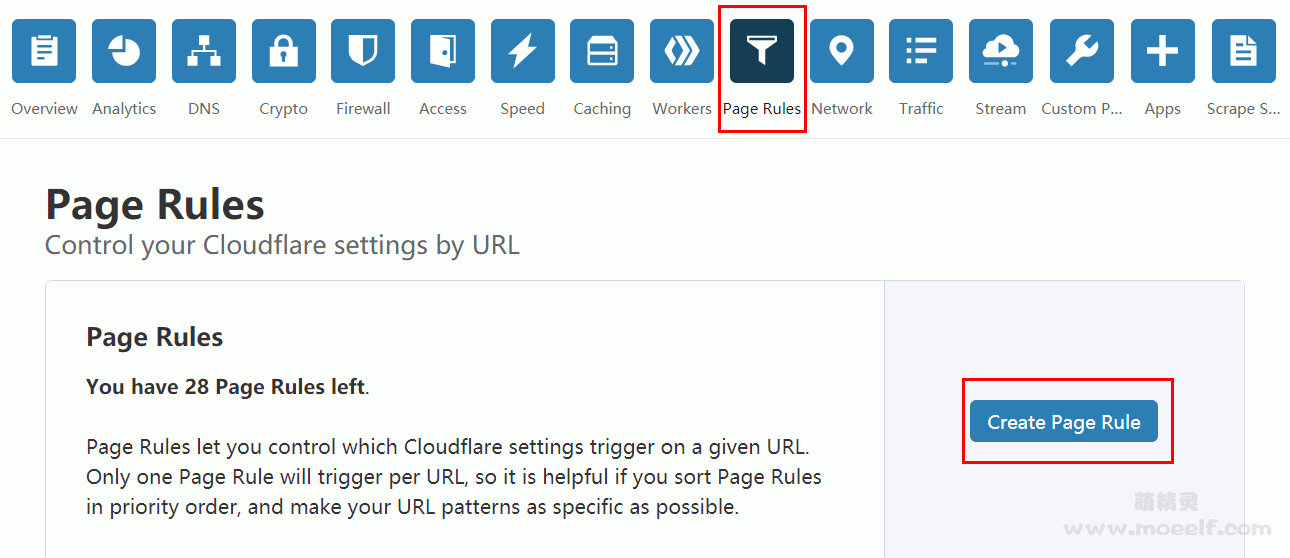
1、添加新的页面规则。

cf_1.png
继续阅读

MTR链路测试诊断网络

  • MTR(My traceroute)是几乎所有Linux发行版本预装的网络测试工具,此工具也有对应的Windows版本,名称为WinMTR。
  • MTR工具将ping和traceroute命令的功能并入了同一个工具中,实现更强大的功能。
  • 相对于traceroute命令只会做一次链路跟踪测试,mtr命令会对链路上的相关节点做持续探测并给出相应的统计信息。所以,mtr命令能避免节点波动对测试结果的影响,所以其测试结果更正确,建议优先使用。

安装MTR

Ubuntu

apt install mtr-tiny

CentOS

yum install mtr

Arch Linux

pacman -Syu
pacman -S mtr

Mac OS X

brew install mtr

Windows下载地址:https://sourceforge.net/projects/winmtr/

使用

mtr -r 8.8.8.8
mtr 8.8.8.8

输出

默认配置下,返回结果中各数据列的说明如下。

第一列(Host):节点IP地址和域名。如前面所示,按n键可以切换显示。

第二列(Loss%):节点丢包率。

第三列(Snt):每秒发送数据包数。默认值是10,可以通过参数“-c”指定。

第四列(Last):最近一次的探测延迟值。

第五、六、七列(Avg、Best、Wrst):分别是探测延迟的平均值、最小值和最大值。

第八列(StDev):标准偏差。越大说明相应节点越不稳定。

诊断

对链路测试结果进行分析时,需要关注如下几点:

继续阅读

wordpress安装插件open_basedir restriction in effect错误解决方法

Update: 如果wordpress按照第三方来历不明的主题或者插件,提示open_basedir restriction in effect错误,一定得注意,该主题或者插件,很有可能有后门,包含恶意跨站攻击病毒。

wordpress下载的第三方插件,上传安装的时候,一直提示如下相关错误:

Warning: scandir(): open_basedir restriction in effect. File(/www/wwwroot) is not within the allowed path(s)

开始以为环境配置问题,调整了很久,换了不同服务器测试,也都是这个错误。

网上查询,原来只需要关闭宝塔面板中的“防跨站攻击”即可。

继续阅读

腾讯轻量云一键DD Debian及Win

#确保安装了所需软件:
#Debian/Ubuntu:
apt-get install -y xz-utils openssl gawk file

#RedHat/CentOS:
yum install -y xz openssl gawk file

#dd win,直链包链接自己找个替换下
bash <(wget --no-check-certificate -qO- 'https://moeclub.org/attachment/LinuxShell/InstallNET.sh') -dd "这里放你要dd包的直链.tar.gz" --mirror 'http://mirrors.ustc.edu.cn/debian/'

#DD成Debian10:
bash <(wget --no-check-certificate -qO- 'https://moeclub.org/attachment/LinuxShell/InstallNET.sh') -d 10 -v 64 -a -p 你的密码 --mirror 'http://mirrors.ustc.edu.cn/debian/'

#DD Debian 9:
bash <(wget --no-check-certificate -qO- 'https://moeclub.org/attachment/LinuxShell/InstallNET.sh') -d 9 -v 64 -a -p 你的密码 --mirror 'http://mirrors.ustc.edu.cn/debian/'

不同镜像:

#国外服务器
bash InstallNET.sh -d 10 -v 64 -a --mirror 'http://ftp.debian.org/debian/' -p "yourpassword" 
 
#国内服务器 
bash InstallNET.sh -d 10 -v 64 -a --mirror 'http://mirrors.ustc.edu.cn/debian/' -p "yourpassword" 
 
#腾讯云 
 
bash InstallNET.sh -d 10 -v 64 -a --mirror 'https://mirrors.cloud.tencent.com/debian/' -p "yourpassword"

拓展:cxhhhhhh魔改版dd(适用于Linux / Windows)

继续阅读

upgrade和update的区别

Linux系统中,upgrade和update的区别:

update:更新软件包列表到最新版本,但是他不会去升级软件;

upgrade:升级软件到最新版本。

所以一般是先update软件包列表到最新版本,然后upgrade安装最新版软件。

引用原文如下:

You should first run update, then upgrade. Neither of them automatically runs the other.

  • apt-get update updates the list of available packages and their versions, but it does not install or upgrade any packages.
  • apt-get upgrade actually installs newer versions of the packages you have. After updating the lists, the package manager knows about available updates for the software you have installed. This is why you first want to update.

Additionally, you can use apt-get update && apt-get upgrade to do both steps after each other.

火车采集器图片绝对地址问题

火车采集器在采集图片ftp上传的时候,经常容易出现图片路径的错误,导致发布后的文章图片404错误。

以wordpress为例,设置如下,图片路径一般就不会错!

  1. 内容采集规则中,将相对地址补全为绝对地址,下载图片

2. FTP文件上传配置

3. 文件图片下载路径配置

搞定!

Fiddler夜神模拟器抓包APP(xposed+justTrustMe解决证书安全问题)

网上搜集的解决方法,亲测对部分APP有效,但是有些app还是会提示网络错误问题,目前没有找到很好的解决方法。

  1. 电脑安装Fiddler
  2. 安装夜神模拟器
    注意Android版本选择5
  3. 安装xposed
    https://pan.baidu.com/s/1snjKwfUcHCBNtEDwvCCa2w
    提取码:2lx9
    安装后重启
  4. 安装justTrustMe
    https://github.com/Fuzion24/JustTrustMe/releases
    安装之后在xposed模块中勾选
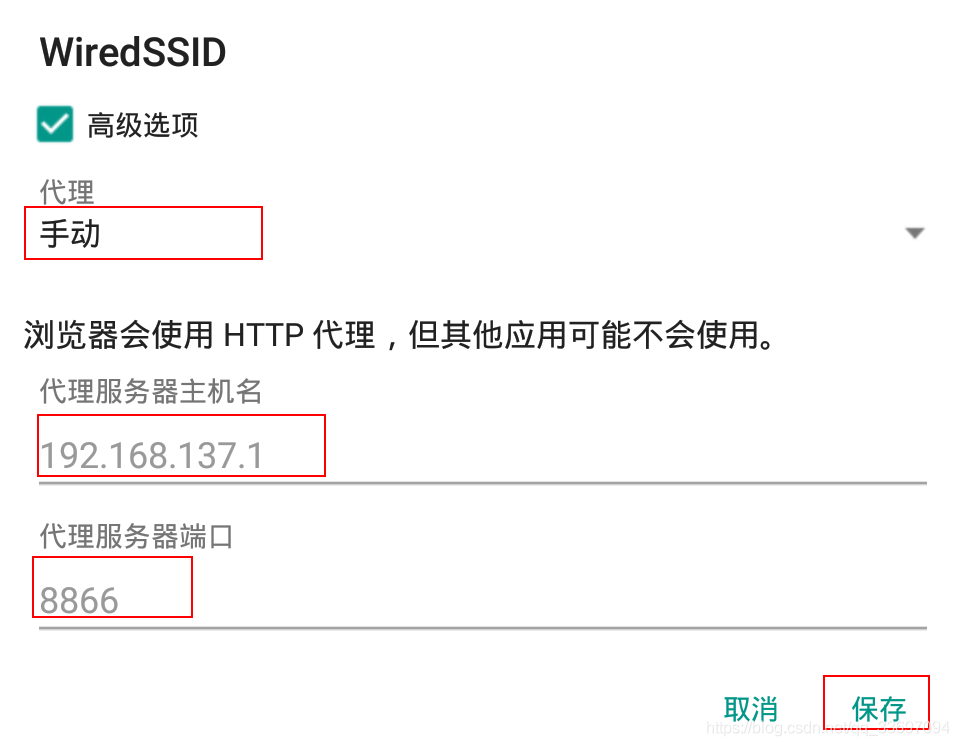
  5. 模拟器设置里找到WLAN网络设置,鼠标左键长按选择修改网络,配置代理
在这里插入图片描述

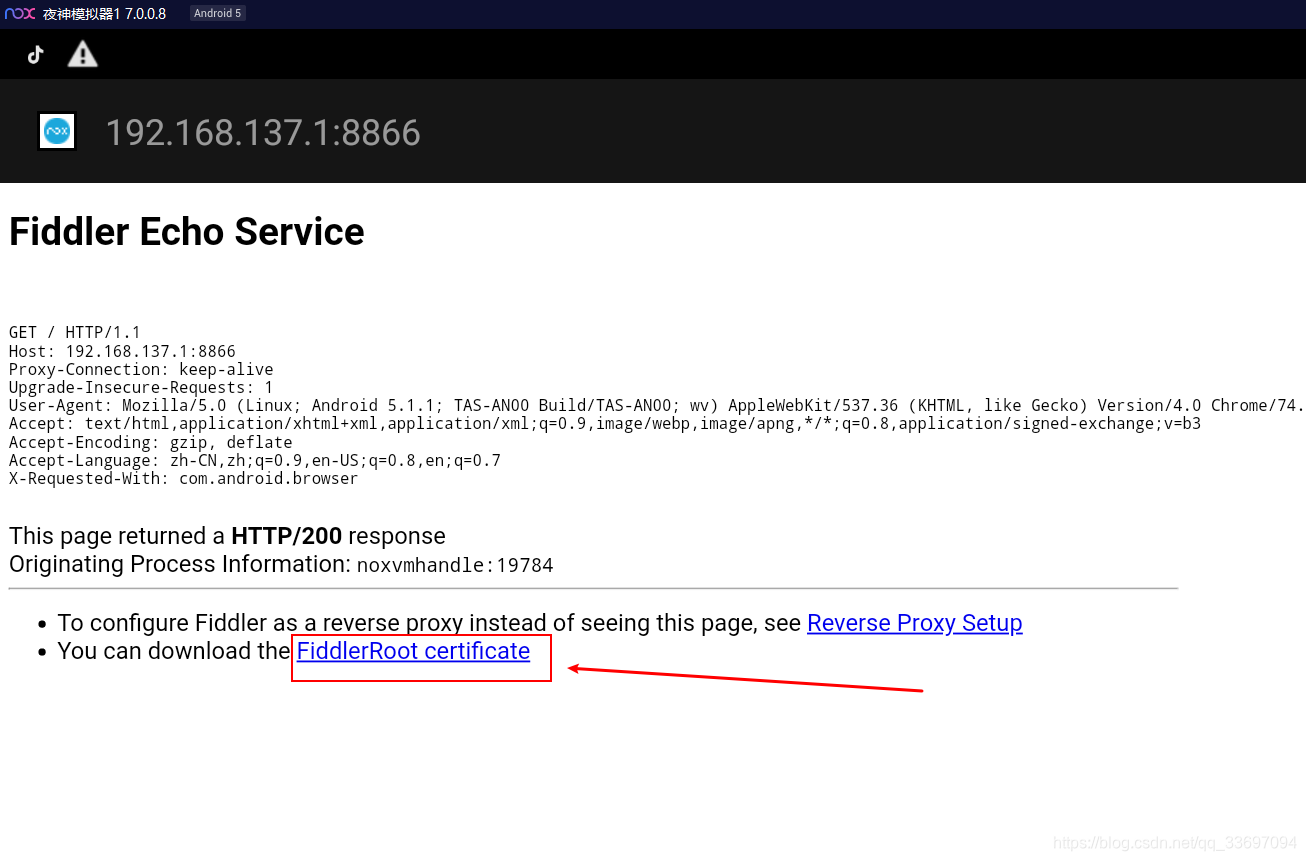
安装证书

在这里插入图片描述